Configuration of the EXPORT Interface of the OCULUS perimeter Series 3 (Twinfield / Centerfield / Easyfield / Smartfield)
Step 1: "PATIENT DATA MANAGEMENT"
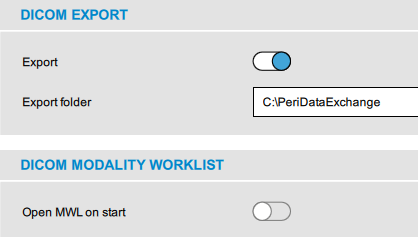
- select Settings

- go to DICOM EXPORT
- set Export = ON
- set Export folder = C:\PeriDataExchange
- go to DICOM MODALITY WORKLIST
- set Open MWL on start = OFF
Note: depending on the medical record software this setting may be ON
- press the button Save to store the settings
Step 2: Instrument Program "PERIMETER"
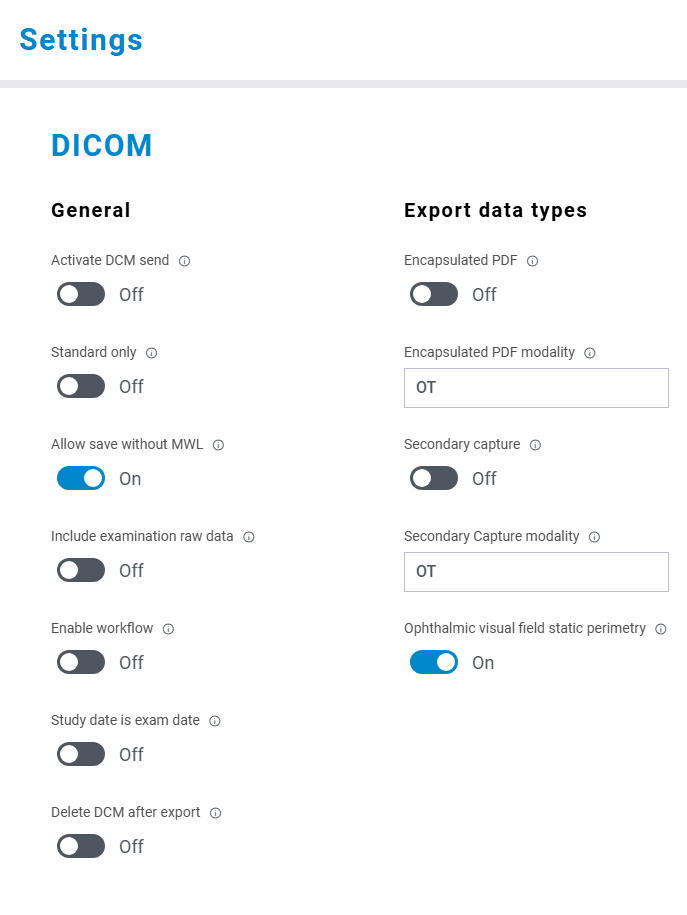
- select Settings
- go to DICOM
- set Allow save without MWL = ON
- set Opthalmic Visual Field Static Perimetry (OPV) = ON
- set all other checkboxes = OFF
- do not change the settings following DICOM Storage SCU
- press the button Save to store the settings
Make the connection: all steps